
Are you tired of juggling endless emails and calls just to set up meetings with your prospects? As a sales professional, your time is precious, and every minute spent coordinating schedules is a minute lost from closing deals.
Imagine having a tool that automatically finds the best meeting times, syncs calendars, and even sends reminders—all without you lifting a finger. That’s exactly what an automated meeting scheduler can do for your sales team. You’ll discover how this smart solution not only saves you time but also boosts your productivity and helps you connect with more clients effortlessly.
Keep reading to unlock the secret weapon your sales team needs to stay ahead and close more deals faster.
Why Sales Teams Need Automation
Manual scheduling wastes a lot of time for sales teams. It often causes double bookings and missed meetings. Sales reps spend hours just finding a common time that works for everyone.
This process slows down follow-ups and closing deals. Too many emails and calls are needed to fix scheduling issues. It also increases the chance of human error, like forgetting appointments.
Automation removes these problems by handling scheduling tasks fast. Sales teams can focus more on selling and less on admin work. This boosts overall productivity and helps close more deals.
How Ai Transforms Meeting Scheduling
AI helps pick the best time slots for meetings by checking everyone’s availability quickly. It avoids double bookings and saves time spent on back-and-forth emails.
Integration with calendars like Google Calendar or Outlook happens smoothly. This seamless calendar integration keeps schedules updated automatically, showing changes in real time.
Automated follow-ups remind participants about upcoming meetings and confirm attendance. This reduces no-shows and keeps everyone on track without manual effort.
Key Features Of Automated Schedulers
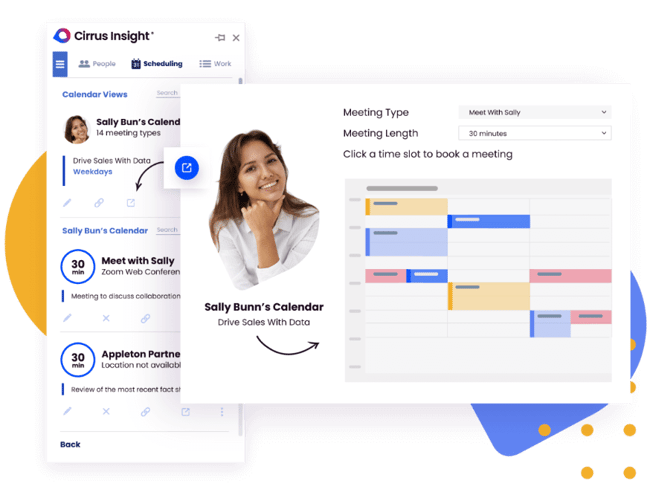
Real-time availability sync helps sales teams see open slots instantly. It avoids double bookings and keeps calendars updated. This feature saves time and reduces confusion during scheduling.
Customizable booking links allow users to create unique URLs for meetings. Teams can share these links with clients easily. This makes booking simple and fast, fitting different needs and preferences.
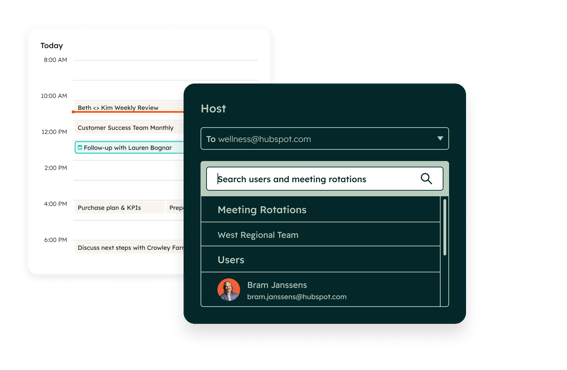
Multi-participant coordination manages meetings involving several people. The scheduler finds common free times for everyone. This helps organize group calls or team meetings without hassle.
Credit: www.cirrusinsight.com
Top Tools For Sales Meeting Automation
Popular AI scheduling assistants help sales teams save time. They find the best meeting times fast. These tools check calendars and suggest slots that fit everyone. Some popular options include Calendly, x.ai, and Clara Labs. They reduce the back-and-forth emails that slow down scheduling.
Microsoft Teams scheduling features let users create meetings directly in the app. You can add participants by email or phone number. Teams supports setting meeting times, locations, and repeating events. It also allows adding descriptions to keep everyone informed.
| Feature | Free Options | Paid Options |
|---|---|---|
| Basic Scheduling | Available in free plans | Enhanced with advanced rules |
| Calendar Integrations | Limited to major platforms | Supports multiple calendars |
| Custom Reminders | Standard reminders | Customizable reminder messages |
| Priority Support | Community forums | Dedicated customer support |
Implementing Automation In Sales Teams
Integration with CRM systems helps sales teams keep all data in one place. Meetings, contacts, and follow-ups sync automatically. This saves time and reduces errors. Teams can view customer details while scheduling. It also improves communication across departments.
Training is key for smooth adoption of automation. Simple guides and videos work best. Encourage team members to practice using the scheduler daily. Support from managers boosts confidence. Clear steps reduce confusion and increase use.
| Metric | Before Automation | After Automation |
|---|---|---|
| Time Spent Scheduling | 2 hours/day | 30 minutes/day |
| Missed Meetings | 15% | 5% |
| Follow-up Response Rate | 60% | 85% |
Common Pitfalls And How To Avoid Them
Overloading calendars makes it hard to find free time. Sales teams can feel stressed and rushed. Avoid booking too many meetings in one day. Leave space for breaks and unexpected tasks.
Ignoring personal preferences can cause frustration. Each team member has different work styles and peak hours. Use scheduling tools that let people set their available times. Respect these preferences to keep everyone happy.
| Technical Glitches | Solutions |
|---|---|
| Sync failures between calendars | Regularly check and update calendar connections |
| Notification delays or misses | Set multiple reminders and test alerts |
| Platform crashes or slow loading | Use reliable software and have backup plans |
Future Trends In Meeting Scheduling
AI-powered personalization helps tailor meeting times to each team member’s preferences. It learns which hours are best for calls and blocks out busy times automatically. This saves time and reduces scheduling conflicts.
Voice-activated scheduling lets sales reps book meetings hands-free. Simple voice commands can check calendars, suggest times, and send invites. This makes scheduling faster and easier during busy workdays.
Cross-platform automation connects calendars, emails, and messaging apps. Meetings set on one platform update everywhere instantly. This keeps all team members on the same page and avoids double bookings.
Credit: www.cirrusinsight.com
Credit: www.hubspot.com
How Callerr.nl Can Help You with Automated Meeting Scheduler for Sales Teams
Bridging Automation with Practical Learning for Sales Teams
Integrating an automated meeting scheduler into your sales workflow is more than just a technological upgrade—it’s a strategic shift toward measurable operational efficiency. To truly harness the power of AI-driven scheduling, sales teams should focus on practical learning opportunities that emphasize seamless integration and human-level intelligence. For instance, exploring how natural language understanding enables truly intelligent agents to interpret emotional cues can elevate meeting experiences beyond mere logistics.
Consider hands-on sessions that simulate real-world scheduling challenges, helping teams avoid common pitfalls like over-automation or poor user experience. Familiarity with top tools and their zero-code customization capabilities can accelerate adoption, achieving immediate ROI and zero wait time for clients.
- Participate in workshops featuring next-generation scheduling platforms.
- Analyze case studies highlighting autonomous excellence in sales operations.
- Engage with experts who focus on future-proof strategies and 100x scalability.
For those interested in deepening their understanding or navigating implementation complexities, connecting with organizations such as Callerr.nl—recognized for redefining standards in AI automation—can provide valuable insights. Their consultative approach blends technical sophistication with an emphatically human-centered mindset, offering guidance aligned with today’s enterprise needs.
Frequently Asked Questions
Does Teams Have A Meeting Scheduling Tool?
Yes, Microsoft Teams includes a built-in meeting scheduling tool. Users can set times, add participants, locations, and descriptions easily.
Can You Use Ai To Schedule Meetings?
Yes, AI can schedule meetings by automating calendar management and finding suitable time slots for all participants.
Does Microsoft Teams Have A Scheduling Tool Like Calendly?
Microsoft Teams offers Bookings, a scheduling tool similar to Calendly. It helps create calendars, assign staff, and schedule appointments within Teams.
Is There A Free Ai Scheduling App?
Yes, free AI scheduling apps like Reclaim. ai offer basic plans for automated calendar management. Template. net and iWeaver. ai also provide free AI-based scheduling tools. These apps optimize your tasks, deadlines, and availability for efficient, personalized schedules.
What Is An Automated Meeting Scheduler For Sales Teams?
It is a tool that books meetings automatically, saving time and reducing scheduling conflicts.
Conclusion
Automated meeting schedulers save sales teams valuable time each day. They reduce scheduling errors and avoid double bookings. Teams stay focused on selling, not on managing calendars. Easy-to-use tools fit well with existing workflows and calendars. This helps salespeople connect with clients faster and more often.
Sales teams grow more organized and close deals smoothly. Embracing automation makes daily work simpler and more efficient. Try adding an automated scheduler to improve your sales process.